
Install a Modpack
Install Minecraft modpacks from CurseForge, Modrinth, Feed The Beast, ATLauncher, Technic and Voids Wrath in one click on your RealisticNode server.
Install thousands of modpacks such as Cobblemon, All The Mods, Better MC, Create packs and Pixelmon without uploading a single file.
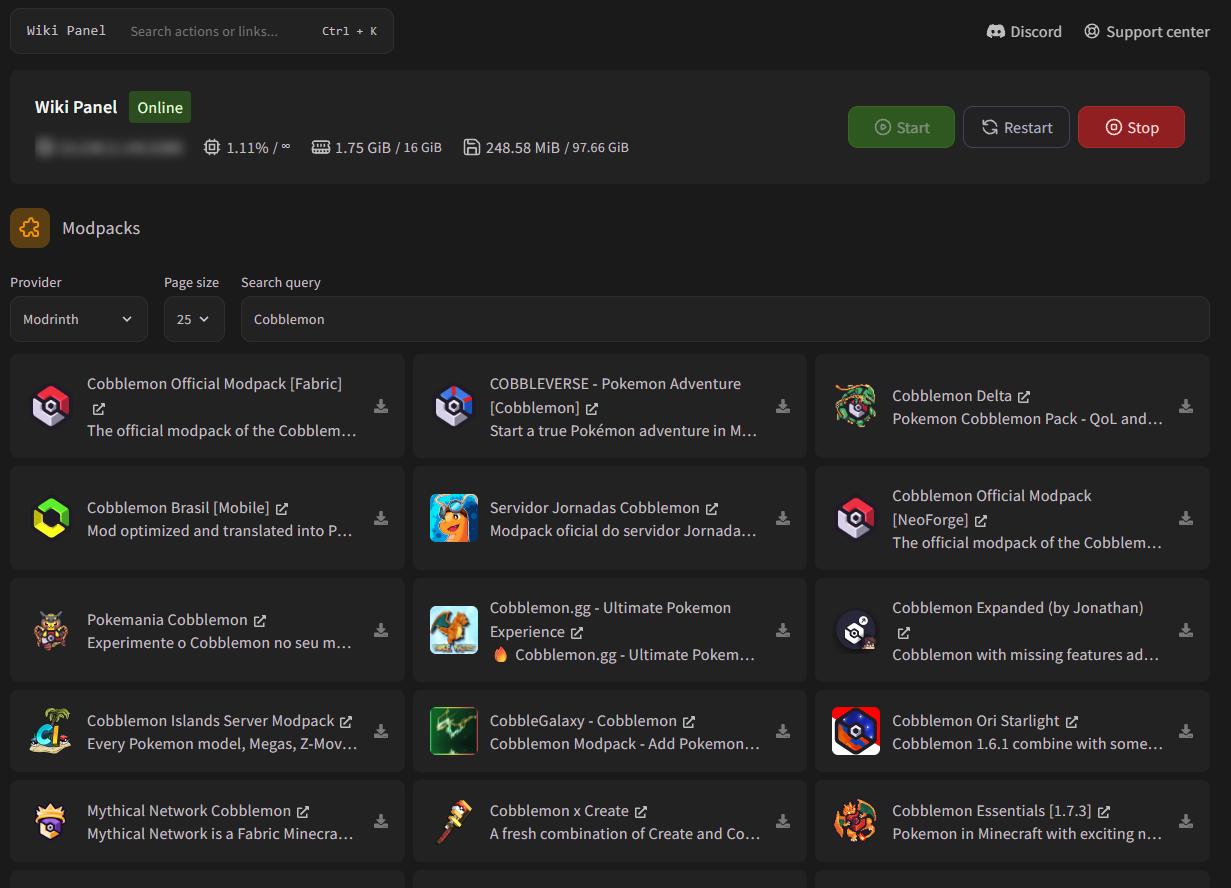
Install a modpack
Back up your server
Installing a modpack removes your current mods and server files. Create a backup first if you want to keep anything.
Find the modpack
Open Modpacks, choose a Provider (the site the modpack comes from) and type its name in Search query. Click the name to open the modpack's page if you want more information.
| Provider | Notes |
|---|---|
| Modrinth | Default. Lots of modern packs. |
| CurseForge | The biggest catalog (All The Mods, RLCraft, Better MC...). |
| Feed The Beast | FTB packs. |
| ATLauncher | ATLauncher packs. |
| Technic | Technic packs. Only the latest version is available. |
| Voids Wrath | Voids Wrath packs. Only the latest version is available. |
Choose the version and install
Click the download icon next to the modpack. Choose the Modpack version (the newest is selected).
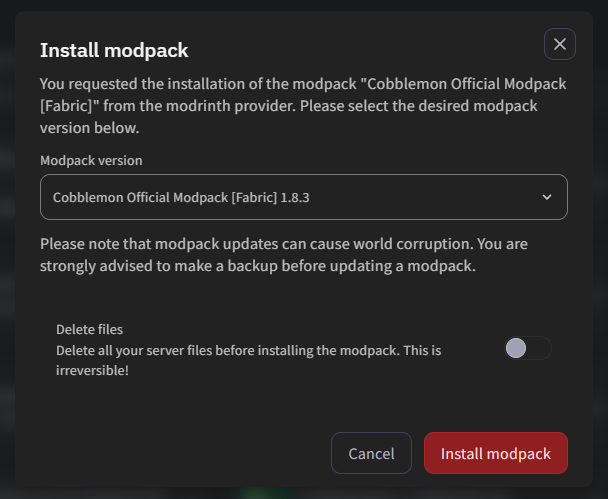
- Leave Delete files off to keep your worlds and configs.
- Turn Delete files on for a completely clean install (recommended when switching from one modpack to another).
Click Install modpack.
Wait and start
The server shows "Running Installer" while the modpack downloads. Big packs can take several minutes. When it's done, the correct Java version is selected automatically. Start the server; the first start of a modpack is slow, that's normal.
What gets removed
Even with Delete files off, the installer always removes the mods, libraries, coremods and .fabric folders, user_jvm_args.txt and server.jar before installing the new pack. The server is also stopped immediately, so save your world first (save-all).
Players need the same modpack
Players must install the same modpack and version on their computer, for example with the CurseForge app, the Modrinth app, Prism Launcher or the FTB app.
Updating a modpack
Install the newer version of the same modpack with Delete files off. Modpack updates can break worlds, so always make a backup first.
Troubleshooting
The modpack uses a different server file name. The pop-up in the console lets you pick the right file in one click. See Server won't start.
Big modpacks need a lot of RAM: usually 6–8 GB or more for packs with 200+ mods. Check the modpack page for the recommended RAM and consider upgrading your plan.
No results, or the provider is temporarily unavailable. Try another spelling or provider.